Before You Prompt, Let AI Ask the Questions
Most people waste entire chat threads correcting AI's wrong assumptions because they give directives without context—flip the pattern by asking the model what it needs to know first, and you'll spend less time fixing and more time thinking.
Most hairdressers won't pick up the scissors until they've asked you a few questions. How short? Layers or no layers? What do you do for work? How much time do you spend styling in the morning?
They do this because "cut it short" means wildly different things to different people. A good hairdresser knows that acting on a vague directive without context is a recipe for someone leaving unhappy — and probably not coming back.
Your AI model needs context too
Now think about how most people talk to AI:
Write me an email to my client about the deal we are working on.
That's "cut it short" energy. And then we're surprised when the result feels off — too formal, too vague, wrong tone, missing the actual point we wanted to make. So we start correcting. No, not like that. Make it less apologetic. Actually, mention the timeline. No, not that timeline.
This is what I call the correction loop — and it's where most people spend their AI time. Not creating. Not thinking. Just fixing.
Here's the thing that took me an embarrassingly long time to figure out: the generic, obviously-AI-generated content people complain about — the stuff that's easy to spot from a mile away — isn't a model problem. It's a context problem.
A painful year of fixing the wrong thing
I spent roughly a year — most of 2023 — locked in this pattern without realising it. Emails, presentations, the kind of everyday output that should be quick but kept turning into drawn-out correction sessions. I was using AI to be more efficient and somehow ending up less efficient.
The moment it crystallised wasn't even my own work. A friend of mine — she works in NDIS support — was trying to finish a proposal. I'd invited her to an event I was hosting and she told me she couldn't make it. The proposal was due and AI was, in her words, driving her crazy. Same story: directive in, generic output back, then ages of be more formal, be more specific, no not like that.
I told her to start a fresh chat, describe what the proposal needed to do, and ask the model to ask her questions first. Then narrate her way through the answers — what she wanted to change, how the tone should feel, what the assessor needed to see.
She came to the event. Thanked me like I'd handed her a cheat code. Not because the AI got smarter — because she'd finally given it enough context to be useful.
Ask what it needs to know first
The technique is alarmingly simple. Open a chat, describe what you're trying to accomplish, and add something like: "hey, I'm trying to do this thing, ask me a load of questions before you start." No elaborate prompt engineering. No frameworks. I talk to AI the way I'd talk to a colleague.
Let me show you the difference.
I opened ChatGPT in an incognito browser — completely fresh account, no custom instructions, no memory. This is where most people start from. I gave it a straightforward task
Write a follow-up email to a prospective client to qualify their intent.
It gave me three options:
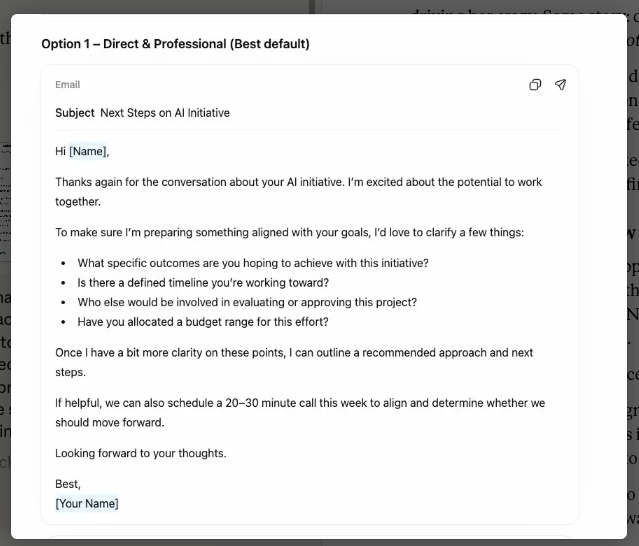
Technically fine. But, completely useless. "Next Steps on AI Initiative" as a subject line...The kind of email that could have been sent by any consultant in any field. Corporate clip art in email form.
The problem? It went straight to solution. No clarifying questions, no pause to gather context — just output. That's what AI will always do if you don't interrupt the pattern first. Same task again, but this time I asked it to gather context first.
I'm an AI consultant, and I've got a prospective client who is interested in doing some work with me. They've signalled initial intent, and I just want to send them an email to qualify that intent. What I'd love for you to do is start by asking me a load of questions to gather all the context that you need to help me craft this email so that you're not making any assumptions or keeping it generic.
It came back with structured questions across eight areas — my positioning, the prospect's situation, tone and strategy, commercial intent, contextual nuances. Some predictable, some genuinely surprising. More on the surprising ones in a moment.
This is part of a series on why I narrate to ChatGPT rather than type — and the way I answered these questions is a good example of why. I recorded myself talking through the answers to show just how conversational this can be. No careful drafting, no editing my thoughts. Just talking.
Narrating all of that is faster than typing it — but it also gives the model richer context. The asides, the qualifications, the "well, actually what I really mean is..." — you stop self-editing and start thinking out loud, which is exactly what produces the specificity AI needs.
Now, let's compare what it produced to the first output:
It references Jason's actual situation, proposes something specific, and matches the tone of the relationship. Not perfect — I'd still tweak before sending — but I'd be editing for preference, not rebuilding from scratch. That gap between "useless" and "85% there" is the entire argument of this article.
And this was a fresh account with zero context. The more you use AI, the more it learns your patterns. Add custom instructions — which I'll cover in a separate piece — and the baseline gets even better.
Questions that surprise you are doing the work
Some of the questions AI asks are predictable. Who's the audience? What tone do you want? What's the goal? Table stakes. They establish baseline coverage and prevent the most obvious assumption errors.
But here's where it gets interesting.
Alongside the predictable questions, the model asked me about contextual nuances I hadn't consciously considered. Is there urgency on their side? Is there urgency on yours? Are they comparing you to someone else? These aren't about the content of the email — they're about the posture. Urgency changes whether you write "when you're ready" or "I'd suggest we move on this." Competition changes whether you lead with credentials or rapport. These are things I might have felt implicitly but wouldn't have deliberately factored into my brief.
The Takeaway
That's the part that reframes the whole technique. It's not just an efficiency hack — though it is that. It's using AI as a thinking tool. The correction loop isn't only wasteful with time; it's intellectually shallow. You're fixing surface-level outputs instead of interrogating whether your thinking was complete in the first place.
When an AI asks you a question you can't immediately answer — hmm, I actually haven't decided that yet — that's not a speed bump. That's the technique working. That pause is exactly the kind of thinking you needed to do before any writing happened, by you or the model. The AI didn't just save you editing time. It caught a gap in your reasoning.

Louis Razuki
Founder & Guide
I write about working with AI — the tools, the mindsets, the builds that actually deliver. Three years of daily AI practice distilled into experiments, insights, and honest takes on what's real and what's just hype.